
You receive an email from your bank asking you to verify your account. It looks official—the logo is right, the language is professional, and it even includes a phone number. But is it?
Table of Contents
ToggleFor millions of older adults, email is a lifeline. It’s how you stay connected with grandchildren, share photos with old friends, manage medical appointments, and access essential services. It’s a tool of independence and connection—one that should bring joy, not anxiety. Yet the same qualities that make email so valuable—its convenience, its directness, and its trustworthiness—also make it a prime target for scammers.
Understanding email marketing risks for older adults isn’t about living in fear. It’s about staying informed, recognizing the warning signs, and knowing exactly what to do when something feels off. The truth is, most email is safe. Most marketing is legitimate. But the few bad actors out there have learned to mimic the trusted brands and personal messages we rely on—and they often target older adults specifically, perceiving them as less tech-savvy or more trusting.
This guide is designed to change that narrative. Our goal is simple: to empower you to enjoy all the benefits of email—the family updates, the travel newsletters, the shopping deals—while confidently avoiding its risks. By the end of this article, you’ll know how to spot a phishing attempt in seconds, protect your personal information, and respond calmly if you ever suspect you’ve been targeted.
Because the best defense against email marketing risks for older adults isn’t fear—it’s knowledge. And you’re already on the right path.
Email Marketing Risks for Older Adults

Why Older Adults Are Targeted by Email Scammers
awareness · empathy · protection
It's not a coincidence that scammers often target older adults. It's a calculated strategy. Understanding why you or someone you love might be more vulnerable is the first step toward protection. This isn't about blame—it's about awareness and reclaiming your confidence online.
Perceived as Less Tech-Savvy
Scammers often assume—wrongly—that older adults are less familiar with technology. This stereotype makes them more confident in their attacks, believing you won't notice the warning signs. In reality, awareness is your greatest defense—and this guide is your first step.
Access to Savings and Retirement Funds
Many older adults have accumulated savings, retirement accounts, or home equity. Scammers know this and tailor their messages to appear as bank alerts, investment opportunities, or pension updates. They're not just fishing—they're hunting for significant financial gain.
Trust and Politeness
Older generations often value politeness and trust. Scammers exploit this by creating messages that feel personal and urgent, making it harder to ignore or delete. They rely on your good nature—but recognizing the tactic removes their power.
Social Isolation
For some older adults, email is a primary social connection. Scammers exploit this by sending friendly, engaging messages—romance scams, fake friendship requests, or "checking in" emails. The desire for connection is natural—but scammers turn it into a weapon.
Unfamiliarity with Reporting
Many older adults don't know how or where to report a suspicious email. Scammers count on this silence. But reporting is simple—and it helps protect others. We'll show you exactly how in a later section.
Urgency and Pressure
Scammers create a false sense of urgency—"Your account will be closed!" or "Immediate action required!" This pressure can overwhelm anyone, especially those who may process information more slowly. Pausing is your best defense: legitimate organizations never demand immediate action via email.
📊 Did You Know? According to the Federal Trade Commission (FTC), adults over 60 reported losing more money to fraud than any other age group—with total losses reaching into the billions annually. The most common contact method? Email and text messages. Awareness isn't just helpful—it's essential.
📘 Educational only · Not medical or legal advice | 🔒 Awareness is your first line of defense
The Most Common Email Scams Targeting Seniors
recognize · avoid · report
Scammers are creative, but their tactics fall into predictable patterns. By learning the most common types of email scams targeting older adults, you can spot them in seconds—and stop them before they cause harm. Here are the ones you need to know.
Phishing Emails
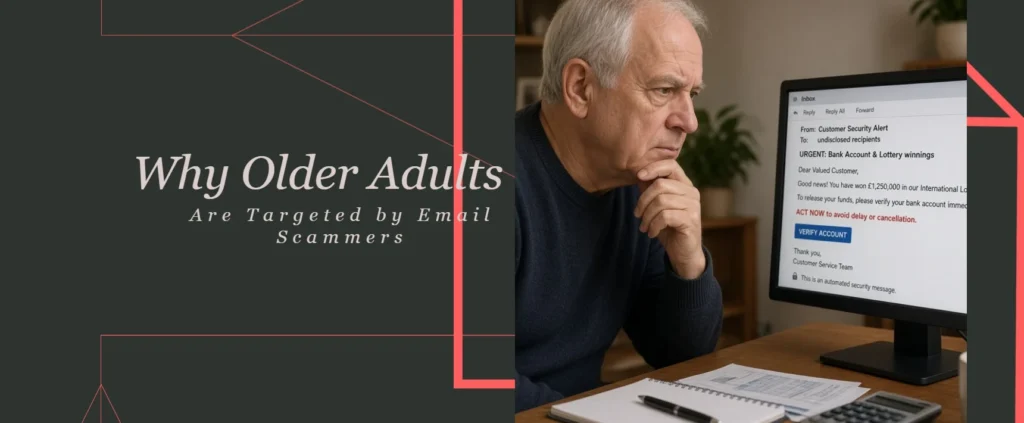
These emails mimic legitimate organizations—your bank, Medicare, Amazon, or even a government agency. They ask you to "verify" your account, "confirm" a password, or "update" your payment information. Clicking the link takes you to a fake website designed to steal your login credentials.
🚩 Warning Signs:
- Urgent language: "Your account will be suspended!"
- Mismatched sender address (e.g., support@bank-security.com instead of bank.com)
- Generic greetings like "Dear Customer"
- Links that don't match the official website when hovered over
Romance Scams
Scammers create fake online profiles and build emotional relationships over weeks or months. Eventually, they ask for money—for a medical emergency, a visa, or travel expenses. They often target widowed
Frequently Asked Questions: Email Safety for Older Adults
quick answers · trusted guidance
These are the questions we hear most often about email marketing risks for older adults. Each answer is designed to be clear, practical, and immediately useful. If you've ever wondered whether an email is safe or what to do after clicking a suspicious link, you'll find the answer here.
How can I tell if an email is a scam?
Check the sender's address, look for urgency, hover over links, and never share personal information via email. Legitimate organizations will never ask for your password, Social Security number, or bank details through email. If an email creates panic or demands immediate action, it's almost certainly a scam.
What should I do if I clicked a suspicious link?
Don't panic—but act quickly. Change your passwords immediately, especially for your email and any financial accounts. Run a virus scan on your device. Monitor your accounts for unusual activity. If you entered financial information, contact your bank right away. And report the incident to the FTC at reportfraud.ftc.gov.
Are email newsletters safe to open?
Yes, if you subscribed voluntarily and the sender is reputable. Look for a clear unsubscribe link and a recognizable sender name. Legitimate newsletters provide value—they don't pressure you to act immediately or ask for sensitive information. If you don't remember subscribing, it's safer to delete.
Why are older adults targeted by email scams?
Scammers perceive older adults as less tech-savvy and may target their savings. They also exploit trust, politeness, and the desire for social connection. Awareness and education are the best defenses—which is exactly why understanding email marketing risks for older adults is so important.
How do I report a suspicious email?
Report it to the FTC at reportfraud.ftc.gov. You can also forward suspicious emails to the Anti-Phishing Working Group at reportphishing@apwg.org. In your email app, mark the message as spam or phishing. Reporting helps protect others and helps authorities track scammers.
Is it safe to use email on my phone or tablet?
Yes, as long as your device is updated and protected. Enable automatic updates, use a passcode or biometric lock, and avoid opening email attachments from unknown senders. The same safety rules apply whether you're on a computer, phone, or tablet.
Originally published on December 16, 2022 | Last updated on November 7, 2026